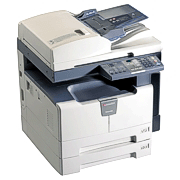
Showing posts with label Copier News and Information. Show all posts

Tuesday, July 26, 2011

Toshiba E-Studio 355 Copier - Copier InformationToshiba E-Studio 355 Copier

The Toshiba E-Studio 355 Copier has out of the box network printing and color scanning capabilities. With the standard networking upgrades, you can plug the Toshiba E-Studio 355 right into your network. The Toshiba E-Studio355 copier is designed for vitually maintenence free copying. The Toshiba E-355 copier first preventative maintenence is at at an incredible 125,000 impressions. The Toshiba E-Studio 355 Copier comes standard with your first toner. The toner on the Toshiba E-Studio 355 copier has yield of 30,000 copies. The Toshiba E-Studio 355 Copier is fast at 35 copies per minute and only takes 25 seconds to warm up. The Toshiba E-Studio 355 copier has E-Filing. The Toshiba E-355 Copier can also produce 11 x 17 copies. The Toshiba E-Studio 355 also has a standard 60GB hard drive. You can also upgrade the Toshiba E-Studio 355 copier with 2 additional paper cassettes for an incredible 3200 sheets of copy paper. The best part of the Toshiba E-Studio 355 copier is the 100 sheet auto document feeder. You also have duplex with the Toshiba E-Studio 355 copier. Call 866-530-8502 today if you have any questions or need to order the Toshiba EStudio 355 Copier.
Toshiba E-Studio 355 Copier
Toshiba E-Studio 355 Copier Specification
Copy Method IEPM (Dry Process)/Laser Technology
Max Monthly Volume 125,000
Copy Speed (CPM) 35 PPM
Paper Cassette 2 X 550 Sheets
Bypass 100-Sheet Stack Feed Bypass
Warm-up Time Appx. 20 Seconds
First Copy Time 3.7 Seconds
Multiple Copying Up to 999 Copies
Print Resolution 2400 x 600 dpi (with Smoothing)
Copy Size Up to 11X17 (Letter, Legal, and Ledger)
Reduction and Enlargement 25% to 400%


Toshiba E-Studio 355 Copier Print Features
Max Print Speed 35 PPM
Print Memory 1GB RAM, 60 GB HDD
Operating Systems Windows 2000/XP/2003/Vista/2008; Mac X OS10.2.4/10.3
10.4/10.5; UNIX, Linux, CUPS
Interface Ethernet 10/100BaseT, USB 2.0, 802.11b/g Wirelesss LAN,
Bluetooth (HCRP)

Other Info
Dimensions Appx. 23” x 23” x 30” (W x D x H)
Toner Yield/Type 30,000 Impressions
Drum Yield/Type 125,000 Organic Photoconductor

Toshiba E-Studio 305 Copier - Copier Information

The Toshiba E-Studio 305 Copier has out of the box network printing and color scanning capabilities. With the standard networking upgrades, you can plug the Toshiba E-Studio 305 right into your network. The Toshiba E-Studio 305 copier is designed for vitually maintenence free copying. The Toshiba E-305 copier first preventative maintenence is at at an incredible 120,000 impressions. The Toshiba E-Studio 305 Copier comes standard with your first toner. The toner on the Toshiba E-Studio 305 copier has yield of 30,000 copie. The Toshiba E-305 Copier is fast at 30 copies per minute and only takes 25 seconds to warm up. The Toshiba E-Studio 305 copier has E-Filing. The Toshiba E-Studio 305 Copier can also produce 11 x 17 copies. The Toshiba E-Studio 305 also has a standard 60GB hard driver. You can also upgrade the Toshiba E-Studio 305 copier with 2 additional paper cassettes for an incredible 3200 sheets of copy paper. The best part of the Toshiba E-Studio 305 copier is the 100 sheet auto document feeder. You also have duplex with the Toshiba E-Studio 305 copier. Call 866-530-8502 today if you have any questions or need to order the Toshiba EStudio 305 Copier.
Toshiba E-Studio 305 copier
Toshiba E-Studio 305 Copier

Toshiba E-Studio 305 copier Specifications
Copy Method IEPM (Dry Process)/Laser Technology
Max Monthly Volume 120,000
Copy Speed (CPM) 30 PPM
Paper Cassette 2 X 550 Sheets
Bypass 100-Sheet Stack Feed Bypass
Warm-up Time Appx. 20 Seconds
First Copy Time 4.7 Seconds
Multiple Copying Up to 999 Copies
Print Resolution 2400 x 600 dpi (with Smoothing)
Copy Size Up to 11X17 (Letter, Legal, and Ledger)
Reduction and Enlargement 25% to 400%


Toshiba E-Studio 305 Copier Print Features
Max Print Speed 30 PPM
Print Memory 1GB RAM, 60 GB HDD
Operating Systems Windows 2000/XP/2003/Vista/2008; Mac X OS 10.2.4/10.3
10.4/10.5 (OS 10.4 PPD), UNIX, Linux, AS/400, SAP R/3
Interface Ethernet 10/100BaseT, USB 2.0, 802.11b/g Wirelesss LAN,
Bluetooth (HCRP)


Other Info
Dimensions Appx. 23” x 23” x 30” (W x D x H)
Toner Yield/Type 30,000 Impressions
Drum Yield/Type 120,000 Organic Photoconductor

Monday, July 25, 2011

Toshiba e-STUDIO 203S - Copier Information

The Toshiba e-STUDIO 203S provides outstanding print, copy, and scan capabilities, in a compact, economical package. The functional versatility of the Toshiba e-STUDIO 203S increases overall office productivity by allowing you to effortlessly print or copy documents from one convenient central location. The Toshiba eSTUDIO 203S supports all popular Windows XP, Vista, and Windows 7. The Toshiba 203S is a great desktop model for small businesses looking to reducing their cost per copy and increase productivity. Call 866-530-8502 today if you have any questions or need to order the Toshiba 203S
Toshiba e-STUDIO 203S


Toshiba e-STUDIO 203S Specification

Automatic Document Feeder 50 Sheet Standard
Duplex NO (standard on the Toshiba E-Studio 203D)
Copy Speed (CPM) 20
Paper Cassette 250 Sheets
Bypass 100 Sheets
Warm-up Time 25 Seconds
First Copy Time 7.2 Seconds
Multiple Copying 1-999
Print Resolution 600 dpi/256 Gradation
Copy Size Up to Legal (Letter and Legal)
Account Numbers 20
Reduction and Enlargement 25%-200%


Toshiba e-STUDIO 203S Print Features 
Printing Standard
Max Print Speed 12 PPM
Print Memory 16MB
Operating Systems Windows 95, 98, Me, NT4.0, 2000, XP
Interface Parallel IEEE 1284 and USB 1.1

Other Info 
Dimensions 23.2"X22.7"X18.5" (W x D x H)
Toner Yield/Type 16,000 Cartridge
Drum Yield/Type 50,000

Toshiba E-Studio 455 Copier -Copier Information

The Toshiba E-Studio 455 Copier has out of the box network printing and color scanning capabilities. With the standard networking upgrades, you can plug the Toshiba E-Studio 455 right into your network. The Toshiba E-Studio 455 copier is designed for vitually maintenence free copying. The Toshiba E-455 copier first preventative maintenence is at at an incredible 125,000 impressions. The Toshiba E-Studio 455 Copier comes standard with your first toner. The toner on the Toshiba E studio 455 copier has yield of 30,000 copies. The Toshiba E-Studio 455 Copier is fast at 45 copies per minute and only takes 25 seconds to warm up. The Toshiba E-Studio 455 copier has E-Filing. The Toshiba E-Studio 455 Copier can also produce 11 x 17 copies. The Toshiba E-Studio 455 also has a standard 60GB hard drive. .You can also upgrade the Toshiba E-Studio 455 copier with 2 additional paper cassettes for an incredible 3200 sheets of copy paper. The best part of the Toshiba E-Studio 455 copier is the 100 sheet auto document feeder. You also have duplex with the Toshiba E-Studio 455 copier.. Call 866-530-8502 today if you have any questions or need to order the Toshiba EStudio 455 Copier.
Toshiba E-Studio 455 Copier


Toshiba E-Studio 455 Copier Specification
Copy Method IEPM (Dry Process)/Laser Technology
Max Monthly Volume 150,000
Copy Speed (CPM) 45 PPM
Paper Cassette 2 X 550 Sheets
Bypass 100-Sheet Stack Feed Bypass
Warm-up Time Appx. 20 Seconds
First Copy Time 3.7 Seconds
Multiple Copying Up to 999 Copies
Print Resolution 2400 x 600 dpi (with Smoothing)
Copy Size Up to 11X17 (Letter, Legal, and Ledger)
Reduction and Enlargement 25% to 400%
Toshiba E-Studio 455 Copier Print Features
Printing Standard
Max Print Speed 45 PPM
Print Memory 1GB RAM, 60 GB HDD
Operating Systems Windows 2000/XP/2003/Vista/2008; Mac X OS10.2.4/10.3
10.4/10.5; UNIX, Linux, CUPS
Interface Ethernet 10/100BaseT, USB 2.0, 802.11b/g Wirelesss LAN,
Bluetooth (HCRP)
Other Info
Dimensions Appx. 23” x 23” x 30” (W x D x H)
Toner Yield/Type 30,000 Impressions
Drum Yield/Type 150,000 Organic Photoconductor

Wednesday, July 20, 2011

Toshiba e-STUDIO 166 -Copier Information

The Toshiba e-STUDIO 166 provides outstanding print, copy, and scan capabilities, in a compact, economical package. The functional versatility of the Toshiba e-STUDIO 166 increases overall office productivity by allowing you to effortlessly print or copy documents from one convenient central location. The Toshiba eSTUDIO 166 supports all popular Windows® 95, 98, 2000, XP, and Windows® NT 4.0 operating systems. The Toshiba 166 is a great desktop model for small businesses looking to reducing their cost per copy and increase productivity. Call 866-530-8502 today if you have any questions or need to order the Toshiba 166
Toshiba e-STUDIO 166


Toshiba e-STUDIO 166 Specification

Copy Method Digital
Max Monthly Volume 20,000
Copy Speed (CPM) 16
Paper Cassette 250 Sheets
Bypass 100 Sheets
Warm-up Time 25 Seconds
First Copy Time 7.2 Seconds
Multiple Copying 1-999
Print Resolution 600 dpi/256 Gradation
Copy Size Up to 11X17 (Letter, Legal, and Ledger)
Account Numbers 20
Reduction and Enlargement 25%-200%
Print Features 
Printing Standard
Max Print Speed 16 PPM
Print Memory 16MB
Operating Systems Windows 95, 98, Me, NT4.0, 2000, XP
Interface Parallel IEEE 1284 and USB 1.1

Toshiba e-STUDIO 166 Other Info 
Dimensions 23.2"X22.7"X18.5" (W x D x H)
Toner Yield/Type 16,000 Cartridge
Drum Yield/Type 50,000


Toshiba e-STUDIO 167 - Copier Information

The Toshiba e-STUDIO 167 provides outstanding print, copy, and scan capabilities, in a compact, economical package. The functional versatility of the Toshiba e-STUDIO 167 increases overall office productivity by allowing you to effortlessly print or copy documents from one convenient central location. The Toshiba eSTUDIO 167 supports all popular Windows® 95, 98, 2000, XP, and Windows® NT 4.0 operating systems. The Toshiba 167 is a great desktop model for small businesses looking to reducing their cost per copy and increase productivity. Call 866-530-8502 today if you have any questions or need to order the Toshiba 167
Toshiba e-STUDIO 167
Toshiba e-STUDIO 167 


Toshiba e-STUDIO 167 Specification
Copy Method Digital
Max Monthly Volume 20,000
Copy Speed (CPM) 16
Paper Cassette 250 Sheets
Bypass 100 Sheets
Warm-up Time 25 Seconds
First Copy Time 7.2 Seconds
Multiple Copying 1-999
Print Resolution 600 dpi/256 Gradation
Copy Size Up to 11X17 (Letter, Legal, and Ledger)
Account Numbers 20
Reduction and Enlargement 25%-200%
Print Features 
Printing Standard
Max Print Speed 16 PPM
Print Memory 16MB
Operating Systems Windows 95, 98, Me, NT4.0, 2000, XP
Interface Parallel IEEE 1284 and USB 1.1


Toshiba e-STUDIO 167 Other Info 
Dimensions 23.2"X22.7"X18.5" (W x D x H)
Toner Yield/Type 16,000 Cartridge
Drum Yield/Type 50,000


Toshiba e-STUDIO 207 - Copier Information


Toshiba e-STUDIO 207


The Toshiba e-STUDIO 207 provides outstanding print, copy, and scan capabilities, in a compact, economical package. The functional versatility of the Toshiba e-STUDIO 207 increases overall office productivity by allowing you to effortlessly print or copy documents from one convenient central location. The Toshiba eSTUDIO 207 supports all popular Windows® 95, 98, 2000, XP, and Windows® NT 4.0 operating systems. The Toshiba 207 is a great desktop model for small businesses looking to reducing their cost per copy and increase productivity. Call 866-530-8502 today if you have any questions or need to order the Toshiba 207


Toshiba e-STUDIO 207 Specification 
Copy Method Digital
Max Monthly Volume 20,000
Copy Speed (CPM) 20
Paper Cassette 250 Sheets
Bypass 100 Sheets
Warm-up Time 25 Seconds
First Copy Time 7.2 Seconds
Multiple Copying 1-999
Print Resolution 600 dpi/256 Gradation
Copy Size Up to 11X17 (Letter, Legal, and Ledger)
Account Numbers 20
Reduction and Enlargement 25%-200%
Print Features 
Printing Standard
Max Print Speed 20 PPM
Print Memory 16MB
Operating Systems Windows 95, 98, Me, NT4.0, 2000, XP
Interface Parallel IEEE 1284 and USB 1.1
Other Info 
Dimensions 23.2"X22.7"X18.5" (W x D x H)
Toner Yield/Type 16,000 Cartridge
Drum Yield/Type 50,000

Toshiba e-STUDIO 237 - Costumer's Guide

The Toshiba e-STUDIO 237 provides outstanding print, copy, and scan capabilities, in a compact, economical package. The functional versatility of the Toshiba e-STUDIO 237 increases overall office productivity by allowing you to effortlessly print or copy documents from one convenient central location. The Toshiba eSTUDIO 237 supports all popular Windows® 95, 98, 2000, XP, and Windows® NT 4.0 operating systems. The Toshiba 237 is a great desktop model for small businesses looking to reducing their cost per copy and increase productivity. Call 866-530-8502 today if you have any questions or need to order the Toshiba 237

Toshiba e-STUDIO 237


Toshiba e-STUDIO 237 Specification 

Copy: Method Digital
Max Monthly Volume: 20,000
Copy Speed (CPM): 23
Paper Cassette: 250 Sheets
Bypass: 100 Sheets
Warm-up Time: 25 Seconds
First Copy Time: 7.2 Seconds
Multiple Copying: 1-999
Print Resolution: 600 dpi/256 Gradation
Copy Size: Up to 11X17 (Letter, Legal, and Ledger)
Account Numbers: 20
Reduction and Enlargement: 25%-200%


Toshiba e-STUDIO 237 Print Features 
Printing Standard
Max Print Speed 23 PPM
Print Memory 16MB
Operating Systems Windows 95, 98, Me, NT4.0, 2000, XP
Interface Parallel IEEE 1284 and USB 1.1

Toshiba e-STUDIO 237 Other Info 
Dimensions 23.2"X22.7"X18.5" (W x D x H)
Toner Yield/Type 16,000 Cartridge

Drum Yield/Type 50,000

Friday, July 15, 2011

Best Copier for Your Business Success -Copier Business Information

Canon Copier
Canon Copier
In any commercial unit, specific devices turn out to be a main necessity of the organization infrastructure and it is not feasible to execute work with out them. The digital framework has swept via the entire organization community at a rapid rate and this has completely transformed the operating style of any office. The indispensable role of copiers in establishment and the requirement of its functioning inside the premises can't be in any way questioned or put under doubt. In any form of an official establishment, it is not feasible to continue functioning in the absence of copiers. These equipments were earlier called as Xerox machines but with the advancement in the technology sector, these units have transformed to provide best quality and high-grade photocopying tasks. The fundamental require of these copiers arises from the necessity of replication in paperwork which is necessary by different departments and individuals in the office.

Ricoh Copier
Surplus Ricoh Copier
Most office equipments in the area of resource need substantial investment which is a constant drain on the overall spending budget. The inclusion of copier service allows 1 to save significant resources on a day-to-day basis and these can be duly allocated to cover other necessities. In addition to this, the photocopiers are substantially viable investments which can be recovered in the lengthy term. The overall efficiency of the process also receives a substantial surge given that the identical amount of function is capable of being done in half the time. The other location which it covers is the prevention of the need to outsource the work to an additional vendor. A dedicated printer copier service is capable of being utilised by the entire office and all the in-home needs of the organization can be adequately dealt with.

Ricoh 3035
Ricoh 3035
Hundreds of models with remarkable attributes have created work quite accurate and time saving. This modern day office equipment is multi-functional and can precisely undertake different tasks like printing, faxing, and scanning all executed by means of the identical technology. The variety in their functions which is drastically extensive and there are numerous copiers including canon and ricoh copiers which are effortlessly accessible in the market that can easily fulfill all the residence, workplace and company requirements. The most widely utilised cheap copiers are the color photocopiers, multifunction copiers, laser printer copiers, network copiers and digital copiers. Nonetheless, first you require to determine on a few crucial aspects which will play an crucial role in the actual option which is created which includes the spending budget and the variable features you are seeking ahead for depending upon the requirements of your establishment.


Thursday, May 5, 2011

Quality Printing made by Ricoh

  Printing everything in writing can be quite costly and time-consuming. Previously, printing utilizing us dot matrix models accustomed to have a large amount of the time as well as provide sufficient results. But in present day modern world, the actual constant rise in computer technology paved the way for the invention of laser -- fast, effective, user-friendly and ready for those types of printing needs. With the increasing need for high end laser ink jet printers valued at a great cost, numerous businesses tend to be contending with regard to cost-effectiveness, speed and also the correct mixture of functions to offer. Ricoh, a very reputable company on the planet of digital technology, released their own line of laser beam ink jet printers. Ricoh printers can either be a monochrome or colour inkjet printer, every model unique when it comes to the features they provide in order to users.

  Copiers made by Ricoh are produced having a great focus on printing skills, price reduction, period saving and environment-friendly improvements. These types of Ricoh printers tend to be compact but extremely effective. These laser beam printers provide different choices that may provide the necessary solution for your everyday printing needs, whether it's quality or amount that the company is following. Ricoh's All-In-One (AIO) print capsule option would be the solution to the continuously increasing supply expenses. Users can choose from a typical Deliver or even High Yield AIO, the former introducing more savings upon provide expenses and also the second option concentrating on the cost of each and every imprinted web page. An execllent offering of Ricoh ink jet printers is the speed, concentrating on the printer procedures which take too much time. Most printers take a lot of time in order to warm-up and prepare for bulky printing duties, after that continue on with another time intensive printing procedure. With Ricoh printers, customers can get the warm-up duration of only Twenty mere seconds as well as very first printing rates of speed of 8 mere seconds. Additionally, Ricoh laser printers may produce around 75 pages each minute in black and white and can accommodate publishing in paper sizes of 11" by 17".

Ricoh copiers offer top quality outputs using their modern printer cpus that may maintain cumbersome and heavy print outs, along with a long line associated with printing work. Users can also go for an additional hard drive and other security features to increase the efficiency of their printing tasks.

Wednesday, May 4, 2011

Konica Minolta bizhub C35P - Konica Minolta


bizhub C35P
bizhub C35P

Ramsey, NJ (Vocus)
Konica Minolta Business Solutions U.S.A., Inc. (Konica Minolta), a leading provider of advanced imaging and networking technologies for the desktop to the print shop, today announced the availability of the bizhub® C35P A4 Color Printer. Perfect for office workgroups that rely on high performance, Konica Minolta’s newest color printer prints at 31 ppm in color and B&W, delivers a first page in less than 12.9 seconds and can produce up to 120,000 pages each month. End-users will enjoy bright, vibrant, jump-off-the-page color from the bizhub C35P thanks to its 600 x 600 DPI resolution.


Minimizing the overall printer size by approximately 30 percent from previous models, Konica Minolta has simultaneously minimized the impact on the environment by delivering printers with significantly fewer parts. At a height of only 13 inches, the bizhub C35P seamlessly fits into any workgroup and because of its compact size, can be placed on either a desktop for individual printing or a busy workroom for networked users.


“For high-definition color, the bizhub C35P will make a significant impact on office workgroups and bring further value by offering an unmatched compact size that is convenient for work environments of all sizes,” said Kevin Kern, Senior Vice President, Marketing, Konica Minolta Business Solutions U.S.A., Inc. “The newest addition to our A4 color line-up raises the bar for performance as a cost-effective solution that ensures customers can always count on Konica Minolta to meet their full range of digital imaging needs.”


Despite its small size, the bizhub C35P does not sacrifice print quality or speed, featuring the exclusive Emperon® Print System with an 800 MHz processor that powers image processing for faster results. With Konica Minolta’s smart calibration system – enhanced Automatic Image Density Control (eAIDC) – prints are enhanced by automatically calibrating the print engine for optimal color quality. Additionally, Simitri® HD color polymerized toner uses Biomass, a renewable organic resource that has less environmental impact than conventional toners.


Click here for more information on the bizhub C35P A4 Color Printer.


Pricing and Availability

The bizhub C35P is available now through Konica Minolta's North American direct sales and authorized dealer channels. The manufacturer's suggested retail price (MSRP) is $ 999.99.


About Konica Minolta

Konica Minolta Business Solutions U.S.A., Inc. is a leader in advanced imaging and networking technologies for the desktop to the print shop. For the third consecutive year, Konica Minolta was recognized as the #1 Brand for Customer Loyalty in the MFP Office Copier Market by Brand Keys. For more information, please visit http://www.CountOnKonicaMinolta.com and follow Konica Minolta on Facebook (@Konica Minolta Business Solutions U.S.A), YouTube (@KonicaMinoltaUS), and Twitter (@KonicaMinoltaUS).


Best Kodak Printers
Best Brother All in One Printers and Multi Function Copier
Kyocera Mita Color Laser Printers
Riso Consumables and Merchandise

Monday, May 2, 2011

Konica Minolta Business Solutions U.S.A. Promotes Rick Taylor

Konica Minolta Business Solutions U.S.A. Promotes Rick Taylor to President and Chief Operating Officer

Ramsey, NJ - April 26, 2011 - Konica Minolta Business Solutions U.S.A., Inc. (Konica Minolta), a leading provider of advanced imaging and networking technologies for the desktop to the print shop, today announced Rick Taylor has been promoted to President and Chief Operating Officer. Taylor will continue to report directly to Ned Umehara in his capacity as Chief Executive Officer of all of Konica Minolta Business Solutions U.S.A.

"Since his 2008 arrival at Konica Minolta, Taylor has been instrumental in building a strong leadership team and leading the development and execution of a corporate strategy that has improved the financial performance, increased the productivity and raised the efficiency of Konica Minolta in a highly competitive marketplace," said Umehara. "I am confident we will be able to steer Konica Minolta towards the aggressive goals and objections we have set for the coming years."

In this newly expanded role, Taylor will oversee and assist the growth opportunities within Konica Minolta's sales organizations in Canada and Mexico.

"When I reflect upon Konica Minolta's success despite the recent economic downturn, I am extremely proud to represent the best team in the industry," said Taylor. "Konica Minolta is entering an exciting time in our history, and I pledge to our stakeholders, business partners, and customers that Konica Minolta will work tirelessly to continue growing market share while delivering on our mission that they can count on Konica Minolta for industry-leading products, solutions, and services."

A graduate of the University of Kansas, Taylor holds a Bachelor of Science degree in Business Administration. Taylor is a four-time winner of the prestigious "Executive of the Year" award based on an annual survey of 300-plus independent office equipment dealers, conducted by Marketing Research Consultants (MRC), the industry group that publishes leading office equipment trade journals, The Cannata Report and LiveWire.

About Konica Minolta
Konica Minolta Business Solutions U.S.A., Inc. is a leader in advanced imaging and networking technologies for the desktop to the print shop. For the fourth consecutive year, Konica Minolta was recognized as the #1 Brand for Customer Loyalty in the MFP Office Copier Market by Brand Keys. BLI has named Konica Minolta 2011 "Line of the Year" award winner for the company's award-winning line of bizhub Color and Monochrome Multifunctional Products. For more information, please visit www.CountOnKonicaMinolta.com and follow Konica Minolta on Facebook, YouTube, and Twitter.


Konica Minolta Contact
James Norberto

Konica Minolta Business Solutions U.S.A., Inc.
+1 201.825.4000

Konica Minolta is a registered trademark of Konica Minolta Holdings, Inc. All other trademarks mentioned in this document are the property of their respective owners.

Saturday, April 30, 2011

Best Photocopier - Photocopier Gallery For Schools and Businesses

  So you took the latest tech magazine and searched the web for top photocopier those funds are able to afford, bought it, and had the photocopier set up in your office; only to find out not much later the device isn't what your office requirements. Now you think about, how do which happen?

Photocopier Unit For Medium Enterprise

   While most evaluations and instructions will tell you the basic specifications and functions of any device, the best photocopiers are determined by your office requirements. Not all photocopiers are created the same way, and exactly what may be an advantageous function for other people may be totally harmful for you personally. This is why identifying the very best photocopier for your workplace is very first tackled by understanding what it is that you really require.

  Photocopiers are quick, in fact, they are very, very fast. The actual query which stands is, how much speed do you want? What a photocopier does quick is actually printing copies. It may print lots of copies in a length of a few minutes. Nevertheless, if your workplace tends to spend more time organizing documents than actually making extra copies, then you definitely might consider forgoing a photocopier with extremely high printing speeds for just one which will automate the sorting duties for you personally. By doing this, you will save time in both making duplicates and planning paperwork.
Photocopier Unit For Small Enterprise

  Space and dimension are important when looking for the photocopier which will fit your workplace. Not every offices may devote an entire space with regard to photocopying; this means that you'll need ample space for that photocopier supplies, room to gain access to and move around the photocopier and finally, room for the photocopier itself. Since photocopiers, no matter how efficient they're, tend to bottleneck the actual circulation of work; it would be a good idea to think about space for individuals browsing collection to make use of the equipment too. Photocopiers come in numerous designs and dimensions. Some of the smaller ones can be put upon tables; this lets you utilize the space below it with regard to storage, and others are larger than single-person desks. Understand that machine is best suited for your work place and discover the best photocopier for your office.


Photocopier Unit For Large Enterprise

  The supply and cost of compatible inks and paper for that machine also needs to be looked at as these determine whether the photocopier will be more trouble than it is really worth in the long run. This also goes for service coverage and warranty from the producers.

  Energy consumption is definitely an frequently overlooked element whenever identifying which photocopiers should be purchased. Ensure that your machine doesn't eat too much power or you will wind up spending on electric power bills instead of having the ability to conserve.

 Lastly, usability is the key to determining whether a photocopier really is best for your workplace. Request the employees on what features they need in a photocopier and learn how well they can make use of the device. Find one that has the features you need however is also easy to use. The very best photocopier, after all, is a that solutions the requirements of work.

Source:


Tuesday, April 26, 2011

Comparison Between Canon and Xerox Photocopiers

    With so many photocopier manufacturers available for sale, picking the best 1 for yourself gets quite difficult. If you're unable to choose whether or not to choose Cannon or Xerox photocopiers, simply check out the functions offered by both manufacturers and invest in the one which fits your needs and budget nicely.
Xerox Unit

  Xerox photocopiers can be easily recognized. These are extremely highly regarded equipments in one from the quality companies. Xerox is each industry and brand. The emblem has set the standard from the photocopiers that many individuals use word Xerox with regard to referring a duplicate device. Xerox is one of the earliest companies that have been producing high-quality photocopiers.

    Quick preliminary web page away technologies makes Xerox a popular brand name when it comes to photocopiers. In case you have actually utilized a big photocopier, you'd know the amount of time it takes for warming up, for checking the actual document and after that publishing it. It requires a long time for the first page to appear within big photocopiers however Xerox Photocopiers like Phaser possess most advanced technology that provides first web page inside 5 mere seconds. The organization understands the necessity of efficiency within the official procedures.

   Other features that are offered through Xerox Picture copiers tend to be that of problem solving and included software, which other companies provide at one more price. The good thing regarding purchasing the Xerox Photocopier is that you will not have a hard time discovering technician to fix it as being the brand has existed for a long period now. Lower use of electricity, reasonable prices and lesser printer ink waste help to make Xerox Photocopy devices popular.


Canon Unit

   Cannon photocopiers on the other hand are also through trusted and recognized make of photocopiers. This brand name provides solutions in the simple desktop computer copiers towards the high-end multi-purpose machines that incorporate number of capabilities such as scanners features, fax machine and printer features in one box. Canon also offers industrial speed photocopy devices that are utilized by publishing and printing machines too.

   Before you choose a cannon photocopier for your use, you have to check out the needs you have. Determine whether you are searching for pace of publishing and duplicating, amount of picture duplicates, types and dimensions associated with document and also the price of photocopiers. If you have a limited spending budget, you can go for used photocopiers. Look online and find utilized photocopiers through various brands. You will not have a problem within buying a photocopier after being familiar with different features offered by both the businesses.

Source:

Further Development of Colour Photocopiers - Photocopying Tips

  Years back we were restricted to the black copy of a standard workplace photocopier, and this was good in the event that black had been all all of us needed. However the more all of us worked in black, there is an increasing must have the ability to tend to use reproduction of colour copies. For a lot of reasons, the actual appeal associated with colour duplicating had been growing, not least from the big publishing expenses associated with delivering artwork to an traditional printing organization who would after that possess minimal needs, and in most cases rather high costs, especially in the case of multicolour publishing. Generally Xerox launched the concept of photocopying in 1959 to change other more time consuming and tedious forms of replication.
colour photocopier

  However it wasn't till 1968 which 3M introduced the actual colour-in-colour photocopier that was employing a coloring sublimation process as opposed to the later on to become launched electrostatic form of copying brought to a color device in 1963 through Cannon. Early on there was a problem with some Governments whenever this found colour photocopying, because of the inherent chance of somebody trying to make use of the technologies in order to counterfeit currency. This was a significant enough issue which determined a few Government authorities started to work on anti-counterfeiting technology that will permit the continuance of production the actual devices, with the understanding that common counterfeiting wouldn't be simple.

  Nowadays we're method beyond those earlier machines, and colour copiers are no longer merely copiers. The most recent growth and development of color photocopiers features a wide range of digital multi-purpose machines capable of a lot more than solely photocopying. A lot more can now be achieved in-house saving time and valuable resources for just about all business, both small and big. Actually many houses now have some form of colour photocopier set up, because of individual comfort, or even educational purposes.

  Along with color photocopiers these days it is possible to have a number of loose colored images and text and within a few moments construct a fully collated and affixed book complete with a cover and other requirements. Previously this would have need to be outsourced to some printer, then delivered to a bookbinder, proofed at every stage and after that packaged and shipped. Right now it may all be made by 1 digital device, right in your own office or place of work. You can also print pictures from disadvantages that have been scanned to the connected printer, or in some cases you are able to straight link the digital camera or video camera to the photo copier in order to get, edit and print one last images straight away.

  Apart from those who made a decision to use black copying with regard to write duplicates or even solely with regard to inner office use, there would 't be too many organizations that don't possess a color photocopier about the property. Clearly there is still main development of colour photocopiers happening and through a lot of companies. We have yet to see exactly what these types of amazing devices will be able to provide us with each year associated with 2 from now.


Source:

Saturday, April 23, 2011

History of the Photocopier Machine

Invention of the Photocopier
  
  A patent attorney called Chester Carlson invented a procedure known as electronica photography in Oct 1937 that was then re-named to Xerography in 1938. The actual "10-22-38 Astoria" had been the very first known photocopy. The Xerography duplicating processes become probably the most well known innovations of the Twentieth century. Carlson became rich from the creation and created a brand new billion dollar industry and obtained globe recognition. It is estimated that Carlson gave away nearly $100 million of their earnings in order to charity and fundamentals before their dying in 1968.
Chester Carlson


Growth and development of Xerography
Xerography
  10 years after Carlson's Xerography creation, he or she found a business to consider this on called The Haloid. The actual Haloid had been a New York dependent photo-paper producer and these people afterwards became Xerox Company.

The very first Office Copier
  
  That created Xerox photocopiers? In '55 Haloid Xerox produced the very first automatic xerographic machine known as Copyflo. By 1958 the first accurate office copier was created. Twenty-two many years after the electronica photography, the first actually commercial drive button photocopier machine known as the 914 was launched.

Good Times for Xerox
  
  In 3 years, Haliod Xerox income increased from 2 million in 1960 to over Twenty two million by 1970, which grew to become a phenomenal success.
In 1961 Haliod Xerox became Xerox and its inventory was on the Nyse. The success grew from the 914 as Xerox launched Twenty-four new products following 20 years.

Changing Marketplace
  
  The actual Xerox control later changed when new manufacturers changed what the world understood as a Xerox machine to some "photocopier" and it was a new starting for that finest advertising battle of the Twentieth century.
As early as '55 Ricoh were emerging as a potential rival with regard to Xerox and created the actual RiCopy 101 Diazo copier. Within 1973 Ricoh had developed the prize successful photo copier called RiCopy DT 1200. Manufacturers for example Minolta, Panasonic, New laptop, Canon, Konica and of course Razor-sharp began to create small workplace copiers, which grew to become a large problem within completion for Xerox's control in the business photo copier marketplace.

Copy machines Today

  These days, Xerox remains one of the planet's frontrunners within the photo copier market together with Sharp and Konica Minolta. Lately, copier devices supply more than just duplicate. They are able to right now printing, facsimile, scan and actually send email messages. This has be a fantastic way to save money on equipment for your office and has additionally supplied companies with more office space, where before they would have experienced separate machines such as ink jet printers, fax machines and copiers and scanning devices.


Article resource:
EzineArticles.com

Blog Archive