Showing posts with label Printing Tips. Show all posts

Monday, July 25, 2011

Toshiba E-Studio 455 Copier -Copier Information

The Toshiba E-Studio 455 Copier has out of the box network printing and color scanning capabilities. With the standard networking upgrades, you can plug the Toshiba E-Studio 455 right into your network. The Toshiba E-Studio 455 copier is designed for vitually maintenence free copying. The Toshiba E-455 copier first preventative maintenence is at at an incredible 125,000 impressions. The Toshiba E-Studio 455 Copier comes standard with your first toner. The toner on the Toshiba E studio 455 copier has yield of 30,000 copies. The Toshiba E-Studio 455 Copier is fast at 45 copies per minute and only takes 25 seconds to warm up. The Toshiba E-Studio 455 copier has E-Filing. The Toshiba E-Studio 455 Copier can also produce 11 x 17 copies. The Toshiba E-Studio 455 also has a standard 60GB hard drive. .You can also upgrade the Toshiba E-Studio 455 copier with 2 additional paper cassettes for an incredible 3200 sheets of copy paper. The best part of the Toshiba E-Studio 455 copier is the 100 sheet auto document feeder. You also have duplex with the Toshiba E-Studio 455 copier.. Call 866-530-8502 today if you have any questions or need to order the Toshiba EStudio 455 Copier.
Toshiba E-Studio 455 Copier


Toshiba E-Studio 455 Copier Specification
Copy Method IEPM (Dry Process)/Laser Technology
Max Monthly Volume 150,000
Copy Speed (CPM) 45 PPM
Paper Cassette 2 X 550 Sheets
Bypass 100-Sheet Stack Feed Bypass
Warm-up Time Appx. 20 Seconds
First Copy Time 3.7 Seconds
Multiple Copying Up to 999 Copies
Print Resolution 2400 x 600 dpi (with Smoothing)
Copy Size Up to 11X17 (Letter, Legal, and Ledger)
Reduction and Enlargement 25% to 400%
Toshiba E-Studio 455 Copier Print Features
Printing Standard
Max Print Speed 45 PPM
Print Memory 1GB RAM, 60 GB HDD
Operating Systems Windows 2000/XP/2003/Vista/2008; Mac X OS10.2.4/10.3
10.4/10.5; UNIX, Linux, CUPS
Interface Ethernet 10/100BaseT, USB 2.0, 802.11b/g Wirelesss LAN,
Bluetooth (HCRP)
Other Info
Dimensions Appx. 23” x 23” x 30” (W x D x H)
Toner Yield/Type 30,000 Impressions
Drum Yield/Type 150,000 Organic Photoconductor

Wednesday, July 20, 2011

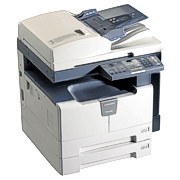
Toshiba e-STUDIO 207 - Copier Information


Toshiba e-STUDIO 207


The Toshiba e-STUDIO 207 provides outstanding print, copy, and scan capabilities, in a compact, economical package. The functional versatility of the Toshiba e-STUDIO 207 increases overall office productivity by allowing you to effortlessly print or copy documents from one convenient central location. The Toshiba eSTUDIO 207 supports all popular Windows® 95, 98, 2000, XP, and Windows® NT 4.0 operating systems. The Toshiba 207 is a great desktop model for small businesses looking to reducing their cost per copy and increase productivity. Call 866-530-8502 today if you have any questions or need to order the Toshiba 207


Toshiba e-STUDIO 207 Specification 
Copy Method Digital
Max Monthly Volume 20,000
Copy Speed (CPM) 20
Paper Cassette 250 Sheets
Bypass 100 Sheets
Warm-up Time 25 Seconds
First Copy Time 7.2 Seconds
Multiple Copying 1-999
Print Resolution 600 dpi/256 Gradation
Copy Size Up to 11X17 (Letter, Legal, and Ledger)
Account Numbers 20
Reduction and Enlargement 25%-200%
Print Features 
Printing Standard
Max Print Speed 20 PPM
Print Memory 16MB
Operating Systems Windows 95, 98, Me, NT4.0, 2000, XP
Interface Parallel IEEE 1284 and USB 1.1
Other Info 
Dimensions 23.2"X22.7"X18.5" (W x D x H)
Toner Yield/Type 16,000 Cartridge
Drum Yield/Type 50,000

Saturday, May 21, 2011

Black Ink Cartridge With regard to Epson Printers - Printing Tips

An ink cartridge offers the ink that is used throughout publishing in a printer. It is a exchangeable component of any kind of inkjet printer and could include one or more portioned printer ink reservoirs. Printers like HP, Canon as well as Lexmark use a thermal ink jet process. Within this procedure, a small amount of current moves through the resistor from the printer when a printing command is actually received because of it. This process heats up the printer's resistor plate. As a result, a lot of it encircling the warmed resistor plate is instantly vaporised in to tiny air pockets within the printer's misting nozzle. Consequently, the entire amount of the ink inside the printer's misting nozzle exceeds that of the misting nozzle. Consequently, a good ink droplet needs out of the cartridge misting nozzle onto the paper, leading to printing.
Epson Printer
Reliable Epson Printer

Epson printers function quite differently. Instead of heating up the resistor components, they will use the piezoelectric crystal in all of their own mister nozzles. When present is actually put on the actual piezoelectric crystal, it modifications size and shape. As a result, a little droplet of ink is forced from its nozzle. The piezoelectric ink jet inkjet printer like Epson enables a wide variety of inks you can use with it. The black ink cartridge provides a high-quality print having a piezoelectric inkjet printer. 

Various variations of black and white cartridges can be found in the actual marketplaces. A few are specifically designed for printing photographs only. These types of tubes are generally very expensive. Original cartridge alternative might price over a brand new inkjet printer. Lots of people therefore use inexpensive as well as compatible after-market printer ink brands. Much of the maker's profits are made up of cartridge as well as toner sales. Therefore, many printer manufacturers such as Epson as well as HP have taken steps in order to limit the actual consumers' choices of utilizing after-market inks.

Laser/toner cartridges that are sold as "Compatible" are usually filled again tubes. Ink cartridges that are sold because "Re manufactured" are the ones which have recently been utilized at least once by a customer and then refilled with a 3rd party.

Epson TM T90 Receipt Printer - Printing Guides


TM-T90 Receipt Printer

Built with the same high quality and reliability of Epson’s best selling TM-T88 series, the TM-T90 brings you the added advantages of ultra fast speed, cost-effective graphics printing, one- and two-color printing and large paper roll capacity. And with an MCBF of 70 million lines, the TM-T90 delivers outstanding reliability that is critical in high-volume environments.


Product Features

  • Affordable one- and two-color printing with print speed up to 6.69 inches/sec
  • Uses paper rolls up to four inches in diameter, resulting in few paper changes
  • Easy, drop-in paper loading with tear-bar or autocutter options
  • Ease-of-use features including Auto Status Back (ASB) messages and a built-in counter for monitoring printer maintenance functions
  • Outstanding reliability with an MCBF of 70 million lines


TM-T90 Receipt Printer


Interfaces: RS-232, Bi-directional parallel, Options: RS- 485, USB, Connect-It™ family
Paper width: 58mm (2.28"), 60mm (2.36"), 80mm (3.14")
Reliability: MTBF 360,000 hours
MCBF: 70 million lines
Overall dimensions: 148(H) x 140(W) x 201(D)mm (5.8" x 5.5" x 7.9")
Color: Epson Cool White, Epson Dark Gray

Friday, May 20, 2011

Epson's Artisan Printers - Printing Preview


Also a  brand new type of Artisan all-in-one printers happen to be created by Epson The united states. The actual Artisan 725 as well as Artisan 835 provide superior image high quality liked by printer 


consumers 3 in order to 1 more than comparable printer rivals. The new Epson Artisan sequence is an ideal for people who often printing workplace paperwork as well as photos.
Epson Artisan 835


The Artisan 725 and 835 provide obvious textual content vibrant colors and sharp, along with six-color Ultra Hi-Definition Claria Epson ink cartridges. Additionally, each feature 2.5 occasions faster cellular connectivity along with Wi-Fi n, wireless publishing through a good Apple iPhone and also the world's quickest 4"x6" photo printing rates of speed. The actual main Artist 835 includes a 3.5-inch color Liquid crystal display, a 7.8-inch smart contact solar panel, built-in facsimile, and a 30-page Automated Record Bird feeder to rapidly facsimile as well as duplicate paperwork.

Additional Features from the Artist Series:

Offers built-in Ethernet as well as wireless networking

Provide fast ISO print speeds of 9.5 ISO parts per million black and 9 ISO parts per million color
Automatic two-sided publishing saves as much as 50 percent associated with paper supply
Produces note paper, stylish letter head, color book webpages, and customized handmade cards

Creates professional-looking dvds by publishing pictures as well as textual content directly onto ink jet printable CDs/DVDs with easy-to-use Epson Print Compact disc software
Functions built-in Car Picture Modification to instantly evaluate and correct pictures and red-colored eye.

Prints programs wirelessly through an iPhone, such as PDF documents, pictures, picture calendars, business paperwork, and much more, via applications on the i-tunes App Shop
Prints pictures directly from digital cameras, cell phones and USB Expensive hard disks with PictBridge®Benefits various publishing needs with 6 individual epson printer ink cartridges from affordable prices. Delivers vibrant, true-to-life pictures along with Epson's unique MicroPiezo® printing mind with DX5™ technologies

Offers a selection of eco features and environmental skills such as, Power STAR® as well as ROHS compliance, and is made to end up being reused


Thursday, May 19, 2011

Epson Thermal POS Printers - Printing TIps

  A point associated with sale printer - more popularly known as the POS printer - is well-liked to most businesses. Different businesses focus on various these printers as well as include several elements towards the result. Energy printer is among the choices a company enterprise may always look for when purchasing POS printers. These printers tend to be geared to automate your own businesses thus reducing the need to document document bills and other paperwork.
ReadyPrint T20 Receipt Printer


Aside from promising the elimination of document receipts, the idea of thermal printers brings lots of changes for your company. It gets rid of the need to replace your own printer ink as often since you need to. What you need to commit upon is really a less expensive thermal paper that is broadly needed in the process. Epson printers must have seen the need to supply your own businesses along with better choices. This particular resulted in the company's very own innovation upon energy POS printers.

Current Innovations in Epson Energy POS Printers

 Epson printers made a type of energy Fea printers to assure a person that you have the options based on your company needs. All these printer models have distinct characteristics over that of the other however they basically retain the exact same benefits and advantages that your companies want to achieve. These types of printers guarantee to carry the most heavy printing lots and are quieter than the then extremely popular dot-matrix printers. Here are a few of the very current improvements in the world associated with Epson Thermal POS Printers:
Epson TM-T88IV POS Thermal Receipt Printer - Monochrome - Direct Thermal
  • TM-T88IV Invoice Printer. This particular printer is considered because the most recent fellow member to the world of Epson Fea printers. This is said to be the very best promoting one of the printers listed in the actual TM-T88 sequence. With 25% quicker printing options than it is friends, you'll certainly think about trading on this device. Much more of its capabilities are noticed in the two-color features and it is guarantees of publishing each textual content as well as graphics at the exact same pace. You will get this particular device at a price associated with $329.
TM-T88IV ReStick Liner-free Label Printer
  • TM-T88IV ReStick Liner-free Label Printer. This addition to the TM-T88IV sequence offers additional methods to your businesses. This is really a mix of a content label as well as receipt printer. Food, stores as well as services will certainly love this product. This particular Epson thermal printer can be your own for only $300.
TM-T88IV ReStick Liner-free Label Printer
Epson TM T90 Receipt Printer

  • TM-T90 Receipt Printer. This Epson thermal printer is reliable especially running a business environments where high-volume publishing is needed. It provides several benefits such as faster speed and cost-effective images printing. Actually, you get your own receipts printed in as fast as 6.69 in . for each 2nd. With a document move of four-inch diameters, regular paper changes will no longer a problem. This particular product expenses somewhere between $345 in order to $355.
TM-L90 Label and Barcode Printer
  •  TM-L90 Label and Barcode Printer. Similar to the TM-T88IV series, the TM-T90 also has the label printer version to offer towards the open public. This printer handles paper thickness which range from 1.50, 2.36 and 2.75 in . to as high as 3.Fourteen as well as 3.Fifty three in .. It is connected to your PC through a Universal serial bus port. Trading on a single of these thermal printers can cost you $385 in order to $485.
M-VT101 Card Printer

  • M-VT101 Card Printer. POS printers additionally operate for the purpose of card publishing. Epson printers provide you with this particular model to help you print loyalty credit cards, seats as well as coupon codes for the enthusiastic patrons. It offers high printing resolutions plus a manual for easier card insertion.
These Epson thermal POS printers truly are great options for your own businesses. You will definitely want to have one of these simple versions in your companies. Make sure that you make a choice that's ideal for your business operations.

Black Ink Cartridge With regard to Epson Printers -Ink Cartridges Tips

 An ink cartridge offers the ink that is used throughout publishing in a printer. It is a exchangeable component of any kind of printer ink jet inkjet printer and could include one or more portioned printer ink reservoirs. Printers like HP, Canon as well as Lexmark use a thermal ink jet process. Within this procedure, a small amount of current moves through the resistor from the printer when a printing command is actually received because of it. This process heats up the printer's resistor plate. As a result, a lot of it encircling the warmed resistor plate is instantly vaporised in to tiny air pockets within the printer's misting nozzle. Consequently, the entire amount of the ink inside the printer's misting nozzle exceeds that of the misting nozzle. Consequently, a good ink droplet needs out of the cartridge misting nozzle onto the paper, leading to printing.

Epson Cartridge
Epson Ink Cartridge


 Epson printers function quite differently. Instead of heating up the resistor components, they will use the piezoelectric crystal in all of their own mister nozzles. When present is actually put on the actual piezoelectric crystal, it modifications size and shape. As a result, a little droplet of ink is forced from its nozzle. The piezoelectric ink jet inkjet printer like Epson enables a wide variety of inks you can use with it. The black ink cartridge provides a high-quality print having a piezoelectric inkjet printer.

Various variations of black and white cartridges can be found in the actual marketplaces. A few are specifically designed for printing photographs only. These types of tubes are generally very expensive. Original cartridge alternative might price over a brand new inkjet printer. Lots of people therefore use inexpensive as well as compatible after-market printer ink brands. Much of the maker's profits are made up of cartridge as well as toner sales. Therefore, many printer manufacturers such as Epson as well as HP have taken steps in order to limit the actual consumers' choices of utilizing after-market inks.

Laser/toner cartridges that are sold as "Compatible" are usually filled again tubes. Ink cartridges that are sold because "Remanufactured" are the ones which have recently been utilized at least once by a customer and then refilled with a 3rd party.

Tuesday, May 17, 2011

Epson Printer Ink Cartridge Fundamentals - Printing Tips

  It's a broadly held belief within the company neighborhood that Epson printers generally offer some of the best print high quality available. Outshining it's rivals by a broad margin. Clearly the technology behind the actual tubes, in combination with the Epson printer ink perform a very big component in the perpetuation of the belief.

Epson Printer
Basic Epson Printer

  Following focusing on a project or even suggestion, if you need to have a print of the same, you'll either use the inkjet printer set up in your home or even office, or go in research of 1.
The easiest way away is to personal the inkjet printer, as well as Epson printers are high quality and are available along with nice warranties as well. These types of printers are available in normal models and top quality with various functions in them and based on your personal needs and choices. Having a printer has become fairly of the requirement once we rely on them from printing documents, in order to air seats and rail tickets, in fact even film tickets because we guide all of them online. With all these necessary print duties to complete it's no lengthier just a comfort.

  For maintenance, really concerning the just issue which occurs is that the ink in cartridge could dry up then you have to take it off as well as shake it a bit to revive it. And also the other thing that can occur is that you simply exhaust printer ink. In which case, you have to pick up a brand new Epson printer cartridge.

  Epson printer is available in 2 colors, or rather two kinds. The first is the actual dark while the second is for other colors. It is crucial that the black cartridge have atleast a little bit of printer ink inside it otherwise the color cartridge won't function. However, if your utilization is just black and while documents, you needn't even buy a color cartridge. Depending on your own printer model, you'll have to purchase a good Epson printer ink cartridge from any Epson support center or computer shop. After you have purchased it, all you need to perform is actually take the cartridge as they are and put this within the holder in the printer. And then make sure to take a check print out to ascertain if it works okay before going on to your primary document.

  Epson Printer cartridges come in a variety of various prices for the black and other color cartridges. So make sure to check the product on buy to see if they fit your own need. The cartridge has been said to work for about 2500 linens associated with print outs, therefore once you have your new cartridge in position, you can relax for some time before worrying concerning the printer ink amounts.

Blog Archive