Showing posts with label Photocopying Tips. Show all posts

Monday, July 25, 2011

Toshiba e-STUDIO 203S - Copier Information

The Toshiba e-STUDIO 203S provides outstanding print, copy, and scan capabilities, in a compact, economical package. The functional versatility of the Toshiba e-STUDIO 203S increases overall office productivity by allowing you to effortlessly print or copy documents from one convenient central location. The Toshiba eSTUDIO 203S supports all popular Windows XP, Vista, and Windows 7. The Toshiba 203S is a great desktop model for small businesses looking to reducing their cost per copy and increase productivity. Call 866-530-8502 today if you have any questions or need to order the Toshiba 203S
Toshiba e-STUDIO 203S


Toshiba e-STUDIO 203S Specification

Automatic Document Feeder 50 Sheet Standard
Duplex NO (standard on the Toshiba E-Studio 203D)
Copy Speed (CPM) 20
Paper Cassette 250 Sheets
Bypass 100 Sheets
Warm-up Time 25 Seconds
First Copy Time 7.2 Seconds
Multiple Copying 1-999
Print Resolution 600 dpi/256 Gradation
Copy Size Up to Legal (Letter and Legal)
Account Numbers 20
Reduction and Enlargement 25%-200%


Toshiba e-STUDIO 203S Print Features 
Printing Standard
Max Print Speed 12 PPM
Print Memory 16MB
Operating Systems Windows 95, 98, Me, NT4.0, 2000, XP
Interface Parallel IEEE 1284 and USB 1.1

Other Info 
Dimensions 23.2"X22.7"X18.5" (W x D x H)
Toner Yield/Type 16,000 Cartridge
Drum Yield/Type 50,000

Thursday, June 16, 2011

Putting Up a Copier and Printing Business - Photocopying Tips

Putting Up a Copier and Printing Business requires resolution, determination and motivation, and many especially, he or she must be business-minded. At the same time, deciding on which kind of business in order to venture in will need a lot of research, research and determining who your target market is.
Putting Up a Copier and Printing Business

Having good business feeling is definitely a must, but some official training on business administration is also essential. But that’s an additional subject worthy of a separate full article. For now, here is the starting point in putting up a business and to stay afloat in the advertising world.
Putting Up a Copier and Printing Business

Figure out your business opportunity ? Discover where your own interests lie. If you like meals, or prefer to eat food, then maybe you would like to put up a small bakery or perhaps a small candy store. If you like reading, then maybe you would like to put up a little bookshop or a little book leasing store (An investment for this the first is a little affordable ? you can just gather all of the books you've read and for a minimal charge, you can have this rented away).

Create a business plan ? Know your market. Are the people around you more likely to eat or to study? Is there a college or a play ground around your neighborhood that?utes filled with chattering college students? Or have you been located someplace where the next house is a thousand miles away?

Naming your Copier and Printing Business ? What? Utes in a business title? Your name needs to be out of the ordinary. It doesn?t have to be catchy, however it must represent your character and the business as a whole. 

Start-up Cash ? Of course, you need money! The easiest method to find money is through your own savings. Or perhaps in some case, your friends the family could nick in to help you start your personal business. You need to buy issues for your shop, or in some cases like a leasing book shop, you probably would like to buy some new books, aside from your old ones.

Find out your business location ? Most personal businesses usually begin at home. This is advantageous for that owner of the business since he doesn?t have to spend on rent. Just make sure that your home is located somewhere and you'll discover your market. Well, if it?s not really located anywhere near your own market, you can always rent a space for just Php5,Thousand or a tiny bit more. Just be resourceful enough to find the best locations for your company.

Set up your accounting system ? Now, this doesn't imply you have to employ an accountant. You can be your own accountancy firm by checking and listing down everything you have sold (This even includes candies that are sold, as low as a peso). By doing this, you can determine how much you have sold throughout the day, and how much you have acquired. Monitor as well as list down your own expenses also, not just your income. Eventually, you can enroll in a fundamental accounting program for a more effective bookkeeping.

Environment up a business regardless of whether big or small is fun, however a little tiresome. It?s all part of the money-making business, however the bottomline is: Just be inspired! Who knows? 1 small business might churn out one of the biggest companies in the united states.

Article Source:

Monday, May 23, 2011

Toshiba 2060/4560/3560/2860 - Basic Copying Tips


GENERAL PRECAUTIONS REGARDING THE INSTALLATION AND SERVICE FOR THE COPIER 2060, 2860/70 AND THE AUTOMATIC DUPLEXING UNIT MD-5002
Toshiba 2060
Toshiba FT 2060

1. Transportation/Installation

  •  When transporting/installing the copier, use two persons and be sure to use the positions as indicated below.
  • The copier is fairly heavy and weighs approximately 73 kg (161 lb), therefore pay full attention when handling it. (2870: 84 kg)


2. Installation

  • Be sure to use a dedicated outlet with AC 115V/15A (220V, 240V/10A) or more for its power source.
  • The copier must be grounded for safety.
  • Never ground it to a gas pipe or a water pipe.
  • Select a suitable place for installation.
  • Avoid excessive heat, high humidity, dust, vibration and direct sunlight.
  • Also provide proper ventilation as the copier emits a slight amount of ozone.
  • To insure adequate working space for the copying operation, keep a minimum clearance of 80 cm (32”) on the left, 80 cm (32”) on the right and 10 cm (4”) in the rear.

3. Service of Machines

  • Basically, be sure to turn the main switch off and unplug the power cord during service.
  • Be sure not to touch high-temperature sections such as the exposure lamp, the fuser unit, the damp heater and their periphery
  • Be sure not to touch high-voltage sections such as the chargers and the high-voltage transformer.
  • Be sure not to touch rotating/operating sections such as gears, belts, pulleys, etc.
  • When servicing the machines with the main switch turned on, be sure not to touch live sections such as the lamp terminal, etc.
  • Use suitable measuring instruments and tools.

4. Main Service Parts for Safety

  • The breaker, door switch, fuse, thermostat, thermo-fuse, thermistor, etc. are particularly important for safety. Be sure to handle/install them properly.

5. Notice Labels

  • Be sure to check the rating plate and the cautionary labels such as “Unplug the power cord during service”, “Hot area” etc. to see if there is any dirt on their surface or if they are properly stuck to the copier during servicing.
6. Disposition of Consumable Parts/Packing Materials

  • Regarding the recovery and disposal of the copier, supplies, consumable parts and packing materials, it is recommended to follow the relevant local regulations or rules.

7. When parts are disassembled, reassembly is basically the reverse of disassembly unless
otherwise noted in this manual or other related documents. Be careful not to reassemble
small parts such as screws, washers, pins, E-rings, toothed washers in the wrong places.

8. Basically, the machine should not be operated with any parts removed or disassembled.

9. Precautions Against Static Electricity

  • The PC board must be stored in an anti-electrostatic bag and handled carefully using a wristband, because the ICs on it may become damaged due to static electricity.

Wednesday, May 18, 2011

How Long Will a Laser Printer, Copier Toner Cartridges Last?

Hewlett Packard, Lexmark, Sharp, Ricoh, Savin, Brother and other manufactures of laser beam ink jet printers as well as copiers' equipment for your office just about all make use of the exact same business regular of how long the compatible toners cartridge may past. They will use the 5% rule. Nevertheless, many people print 7%to 12% on the typical.

First, we need to define what is the 5% rule toner capsule utilization on your laser beam inkjet printer, electronic copier all-in-one machine. Whenever Hewlett packard toner cartridge specifications says 10,Thousand pages at 5% it means 10,000 webpages of text Dual space on the 8.5" by 11" with 1.25" margins (see beneath with regard to real sample of 5% textual content d web page). Should you just deliver easy memos on your laser beam inkjet printer copier then you're set. However, most companies particularly accountancy firm as well as attorneys use way more compatible toners for each page compared to 5%. This is a 5% (between the dotted lines web page associated with compatible toners upon HP laser inkjet printer, Razor-sharp photo copier, Canon inkjet printer photo copier or other brand of equipment for your office:

Start this really is 5% page protection for a hp inkjet printer or even electronic copier. You will notice it is just 2 sentences long. If this sounds like all you printing about the typical then the believed webpages for each toner cartridge the manufacture identifies will be close. Nevertheless, you will observe there are not graphics, company logos or even anything else. If you print graphs or even tax statements a person price associated with usage will be much higher.

If you work with a color laser beam printer copier you will want to be cautious. If the colours compatible toners cartridges on your laser beam printer or digital photo copier states 5,000 pages then it is not really 5,Thousand every color toner cartridge but the COMBINED complete of the cyan, magenta as well as yellow-colored. This particular finish of 5% coverage example of text a standard sheet of paper printed in your laser printer, colour copier or even all in one photo copier inkjet printer scanning device device -- end of 5 %.

Monday, May 16, 2011

Liquid Copier Selling Price - Philippine Photo Copier Business

Liquid Copier
Liquid Copier

   Liquid Copiers Price Range Would Vary According to their Speed and Intact parts. The Savin 770 and related Counterparts such as Ricoh and others, Running condition would range from 15,000- 30,000.

Along with Price range here are the Break Down of Its Basic Parts and Consumables that easily worn out:

Price may vary through Location

Selenium Drum: Php 2,800 - 3,500 ( Depends on the Brand)
Halogen Lamp: Php 400 - 800  
Cable Drive : Php 250 - 500
Rubber Drive - Php 80 - 120
Premix Ink - Php 90-120 (Depends on Mixing - Ideal should be 1liter toner for 8 liter dispersant)
Scraping Blade - 250- 500


For further information regarding liquid copier don't hesitate to give comment.

Sunday, May 15, 2011

Smart Methods to Evaluate Photo copier Machines - Photocopying Tips


Photo copier devices are office supplies online that hold important role with regard to operating t he company. When you are going to get this machine, you need to be sure that you receive the best machine that matches your needs. This is because this machine does not are available in the one-size-fits-all option.

To get the very best machine that you need, you need to have comparisons among the accessible copier machines in the market. You will find three primary stuff that you should compare when you're looking for this machine for your needs. They are the characteristics, the dimensions and the cost of the actual machine.

Functions When searching for the features in copy machines, you should think about the rate of the devices do the duplicating work. It's also wise to consider the automated options they have and also other stuff that can be done through the machines rather than duplicating. You will notice that there are some options of machine that have multi-purpose such as checking and publishing. You will notice that these types of photo copier can be really ideal for your company. Therefore, it is important to be aware of functions that you'll require prior to choosing to which copier you will proceed.

Size The actual copy machines that you could get in the market may are available in numerous dimensions. You will find that the industrial machines will require up large places inside a particular space. But, these types of photo copier only bring benefits for that large businesses that big amounts of duplicating jobs. If you are going to make use of the actual machine for your personal use or even divisions that have couple of employees, you should choose the more compact 1.

Price Price might be the most crucial thing to consider that you should evaluate when purchasing copier devices for your needs. You should look at the characteristics of the machines to be able to determine whether the actual devices count to purchase or not. Ensure that you pick the copy machines which have functions that you use most for your needs. You will find that this is not worth purchasing the copy machines with features that you do not require.


Right now, you can buy the right photo copier machine by doing those evaluations. You will notice that doing such comparisons will be very important to perform in order not to rue later on.
In the market, there are lots of options of copier machine that you could choose. Including Ricoh copiers which will provide you with wonderful features for copying work that you ought to do. 


Saturday, May 14, 2011

Record Checking as well as Administration Systems

  Document administration systems allow companies store and search electronic documents, whether they are scanned pictures or Microsoft office paperwork, PDF files or even Computer-aided-design sketches. A few have a web-based user interface to let you view files online, while others come with an set up client software with regard to much better pace and functionality. Many of these solutions require a main database and storage server to keep the documents as well as index info employed for looking.

  These record administration methods require a few days in preparing, installation, setting up as well as training. This is definitely period wisely spent, ensuring that a correct as well as optimal execution first may change how any organization works with its information.This particular evaluation highlights a variety of amazing document scanning and document management software program, with key functions which they provide.

Systems to Store, Research and examine Paperwork

 PaperVision through DigiTech and CompuThink's ViewWise both provide fully featured, HIPAA-compliant (Medical health insurance Mobility as well as Accountability Behave) document management methods. Both of these systems can grow along with organization requirements, and therefore are affordable sufficient for smaller businesses yet effective enough for big companies too. Every provides some benefits that the other doesn't.

  To take Paper Vision first: this software program collection features a customisable software for looking as well as viewing, in addition to a web interface. PaperVision also has work-flow as well as report management modules that increase any roi by allowing the actual automation associated with document procedures and eliminating pre-printed forms.

 A "lite" version called PaperVision XPress provides a similar search user interface as PaperVision Enterprise, however comes in at less cost, without the extra scalability, security and options.

  The other fully featured in-house system showcased here is ViewWise. This system is unique in that it is Java-based and can operate on Windows/SQL Server as well as Novell, UNIX and Linux system os's and Oracle data source machines. ViewWise also has a number of key variations in the layout of its user-interface that lots of customers prefer. This includes a folder look at for browsing paperwork.

  For any simple, inexpensive scanning front end for these document storage and retrieval systems, a fascinating product is SimpleIndex - that complements each. SimpleIndex is designed to interface directly along with each PaperVision as well as ViewWise, and so provides a easy, low-cost automatic checking front-end.

  In fact, SimpleIndex includes its low-cost searching and viewing application that can be used for basic document management tasks, and thus SimpleIndex may be used like a stand alone document management system, or even added to allow the research as well as watching associated with documents on other workstations.
Another record administration product is DocuLex WebSearch. This system is a different for the reason that it can automatically index all paperwork folder material, similar to the way in which Google Desktop computer works. Networked users are able to explore values in filenames, file qualities or document contents. Furthermore, users may entry files using a web site - a large advantage for distant workers working outside the confines from the business building.
Web Located Record Administration Solutions

  The choice within items to permit internet use of retrieveable record storage space is actually wide.to provide use of documents through the Web. A reasonably priced system is Ricoh's DocumentMall which is depending on EMC Documentum's Business Content material Management platform.

 Digitech PaperVision referred to over, also provides a web interface using its record management server. This enables businesses to store its paperwork with regard to entry on the internet. But an alternate from the same steady would be to go for their own ImageSilo devoted hosted answer. ImageSilo offers much more functions compared to Ricoh's DocumentMall, so the month-to-month price is higher..

 DocuLex WebSearch includes a little workplace (10 user) as well as unlimited person variations that provides web-based access to documents making use of your in-house machines and a Search engines Desktop style search interface.

 CompuThink ViewWise web clients are available too, giving you complete use of record management capabilities over the web. Absolutely no located option would be available for ViewWise.

Batch-Scanning for Importing into a Record Administration System

 SimpleIndex allow users to move files straight to the actual PaperVision and ViewWise order transfer format, by indicates a 1-click checking user interface as well as powerful dynamic Eye Personality Recognition to those systems. At the same time, Digitech PaperFlow may be the recommended scanning interface for PaperVision. This too offers built-in exports -- however these also allow exports to almost any kind of record administration program, therefore it may be used whichever one you select. PaperFlow is more suitable for multi-user scanning and indexing designs, while SimpleIndex is better with regard to desktop computer or dispersed capture scenarios.

Systems for Use along with Multi purpose Ink jet printers as well as Copiers

 Amongst software program created for make use of along with network-attached multifunctional printer and copy machines tend to be DocuLex Goby as well as SimpleIndex., Additionally, the all-embracing scanning as well as storage space system INVU is a simple to make use of record scanning, storage space as well as access system preferred by numerous business gear proprietors looking to increase their record handling work-flow effectiveness.

Useful tips For selecting a brand new Photocopier

 
 Thinking about investing in a brand new photocopier, one thing to consider is how a lot the actual photocopier will be utilized. It might be helpful to total out the number of duplicates could be made each week or even 30 days, then the amount of copies or even prints, that might be required when the company grows.

  This method may well help determine the dimensions and speed (cpm/ppm) from the potential photocopier. Discover whether the photocopier you are looking at includes a 'duplex function' for which is called dual on the sides printing. Paper usage could be reduced by choosing this particular duplex function -- if it is right for the type of paperwork you intend to printing.

  It's a good idea to decide regardless of whether the colour or even monochrome photocopier is required by your organization. If you don't require colour documents regularly a basic monochrome photocopier might well end up being all that's necessary.

  But if you need mostly monochrome copy machines but containing little items of colour, for example logos or illustrates, after that selecting a photocopier which allows a low level of color photocopying, instead of a complete colour photocopier -- would be wise.
A normal color photocopier could be required to print out paperwork such as presentations including color. The more suitable option for high quality duplicates that have absolutely no colour restrictions would be a photocopier which why don't we a company do professional color publishing.

  Lots of brand new multifunctional photocopiers come with the ability to facsimile, scan, printing and shop paperwork together with producing top quality duplicates. Selecting this sort of photocopier depends on your company model - but tend to cut costs in the long run.

  When you're examining the particular features of the photocopier, ensure that it has a low standby power. Particular new photocopiers only have 3 Watt standby use of power, in comparison with 690w for some devices. A few photocopiers have the function associated with instantly getting into the actual standby setting - when getting used. Many of them also have rapid start-up times. Such functions might might save a substantial amount of energy.

 The photocopier is really a moderately big expense for any company to consider, therefore creating a cheque list of functions you might need will assist a person when buying a photocopier. The ultimate touch goes together using the fact that the majority of established companies will provide you with strong guidance when it comes to that photocopier to select -- and for much more satisfaction, you would do well to choose an authourised store of the brand of photocopier you want to buy.

Thursday, May 12, 2011

Photocopier Purchasing Tips - Putting up a Photocopier Business in the Philippines

Liquid Copier - Old School (Still Works in Philippine Photocopying Business)
From Sunrise to Sundown Copying Machine
Evolve Colored Multi Task Copier with Reliable Speed and Performance
For Medium Enterprise
Colored Copier Heavy Duty Performance Built for Small Enterprise Capable of Catering Walk-in  Costumer

Black and White Copier Heavy Duty Performance - Reliable for Small Enterprise Capable of Catering Basic Documents 
Black and White Small Copiers Suitable only for small scale copy loads  
  
 With various surveys and research determining the actual efficiency of a specific business like a main way for business owners they are driving sales and productivity, people from the procurement department or those accountable in purchasing office equipments as well as materials needed in the business tend to be struggling with how you can truly find the right office equipment before effectiveness as well as efficiency problems become problems.

  Throughout the past few years, various market reports possess stressed the need for business people or employers to maintain quality as well as dependable workplace tools, stating efficiency with work through reliable tools as one of the primary factors that figure out an employee's first impact of the office or together with his working environment. It's positioned increasing stress on the procurement manager in order to similarly provide useful choices when choosing and purchasing the things.

  The need for well-timed, doable info on choosing the right tools for the workplace has never already been so severe. To meet this particular require, a number of studies as well as studies have already been carried out to generate practical ideas when choosing these essential tools at work.

1. Understand what you'll need
Before selecting an office tool, it is best that you clearly understand what your business needs. If you're working in an advertising agency, for example, it's best that you select a printer providing you with top quality printing supplies, with the correct hues as well as color combination. In some instances, colors may appear different from the actual gentle copy you have within the computer. Getting these variations may greatly place your company in danger.
For those who have an freelancing company particularly a phone call center, choose the best machines for phone calls. Bear in mind your agents' comfort as well.
You can also attempt considering the amount of work you've using a particular office machine. For instance, with regard to printers, it is best to buy a heavy-duty, multi purpose printer thinking about the type of jobs the employees need to produce.

2. Check your space
Not every large things will invariably look great, especially if you have limited office space. It does not really matter in case your workplace device is one of the most modern facilities in the world. So long as it does not impede work circulation round the area and doesn't block visitors circulation within the vicinity, your workplace device is going to be alright.

3. Shop as well as evaluate
Not all equipments within the workshop were made the same. At most, they vary in costs as well as deals. Therefore, should you actually want to end up with a set of good-looking, high quality paper shredder or printers, it is highly recommended that you research additional suppliers very first and evaluate the score.

It does not suggest that one or 2 providers can give you the price you have bargained for. Extra sources may put you on the higher advantage.

4. Purchasing on the internet wisely
  With regard to comfort as well as quicker dealings, you are able to opt for online buys. Nevertheless, it's best that you simply take all of the necessary preventive steps to avert being wronged by fraud or identity theft. It's best that you simply make sure the highest form of protection within the site you've dealings with. Be skeptical of giving personal information right away. If you feel the actual deal particulars is not that clear for you, contact the actual supplier's customer service immediately or even individually go to their workplace to achieve the discrepancies or even misconception settled.

 These are just some of the many tips you may find online or via a few colleagues and friends that will help you select the right tool for the workplace and company. Embracing just about all feasible assistance to help you arrive at the practical choice won't prosper for you personally company but many significantly on your finances.

Wednesday, May 11, 2011

Putting Up a Copier and Printing Business - Photocopying Tips

What ever business comes to one's mind you have to need this:

1) Create your own business plan.

Business Planning


  Business that don't write a business plan generally fail you must know what you anticipate for the business. Where is this going? Will you some day time have a business or even are you going to only have one location? What type of advertising in the event you perform? How much does it price with regard to store gear employees tools elevates ect. You have to write an agenda to understand where you are headed. You wouldn't strategy a visit without having looking at a roadmap would you? Ensure that you map out your business to see long term ideas.

For Business Plan samples at www.businessplanning.ws

2) Process your Business and License Permit:  
Operation Permit

Phone the local Licensing or Local Department of Trades they are the best place to begin they can tell you about loans, free publications and so much more. Also 


3) Open up a company account:
Signing for a Bank Account

   This is very essential you'll need an account simply for the company to cover company costs. This is where lots of companies fall short they invest company profits upon individual bills. In the first few many years of business the company should keep 80% of income to maintain itself and develop. Yes, it is tempting but be cautious. Get in touch with a person nearby financial institution and obtain the absolutely no charge checking account for your business.


4) Obtain insurance coverage:
Insured your Investment

  You must have storage insurance if you will possess workers you'll need worker compensation  insurance and you ought to check into no matter what additional liabilities there may be for your area fire, severe weather,tornado ect. Insurance coverage can make or split your own growing company for those who have insurance and also the shop uses up lower insurance can pay to replace your own shop. Or if you have disability insurance coverage for just oneself if your one man company. If you split your own wrench hands you can maintain the company for months until you get better.

5) Choose a location
 look for a strategic Location

 A strategic Location ensure that you look for a store right by the highway or even primary highway or if you cannot place you shop in the middle of your own hectic city. If you can look for a shop location through the freeway it will be very lucrative for the company.


Choose a Space which can accommodate all your machines.


6) Advertise
Choose the Proper Channel of Advertising

 Good advertisement is the best way to attract costumer in fact it is the one of the company big expenditure at the beginning of  a business. Making Gossip to Friends about your new shop. 

Liquid Copier Business Philippines


  Vintage Liquid copiers are one of the most dominant resource of fast and reliable copier in the Philippines. In fact it is the most cheap and vibrant photo copier machine that can be seen anywhere in front of Universities and Schools.Price would range from 40cents - 75 cents per copy. 

Monday, May 9, 2011

Ricoh FX 16 your Business Solution Need - Photocopying TIps


Ricoh FX 16 inkjet printer 

  Coming in a compact dimension that easily materials any small office or even home setup. The Ricoh FX 16 is really a sleek printer that mixes aspects of style, versatility and usefulness. The actual inkjet printer utilizes the best Ricoh FX 16 inkjet printer compatible toners to create any kind of task quick little. Presently there really is absolutely nothing that can compare with including consumer electronics to your home or even little workplace that may really improve your function capability.

  Easily using nearly all modern operating-system this particular Ricoh inkjet printer runs into absolutely no issues at all with installation or interfacing with regards to it is compatibility with your Personal Computer. The direct and simplistic menus as well as connects of the Ricoh FX 16 can make coordinating your gadget along with any program or even project extremely simple.

The printer user interface is simple to make use of as well as features a really intuitive learning curve that is a lot more than helpful for new or unskilled customers. Publishing like a expert is easy using the Ricoh FX 16. Making many high quality images is as simple as the actual switch of the change.

  Working with most common types of paper the printer delivers neat and comprehensive printing prowess of all any typical press format. The ample document enter tray enables you to have plenty of document to meet actually your own most important projects head-on. Whether you're looking to print on labeling, the envelopes, cards, or just regular paper the Ricoh FX 16 has a person totally covered. Coupling your own printer along with Ricoh FX 16 printer compatible toners is a assured way to get exquisite prints upon any project you might have.

  Compounding the machine into your home or even small office isn't challenging. The universal hardware and user friendly set up directions make any kind of setup simple. If you're searching to just printing out of your home pc or function the Ricoh FX 16 into your whole small office system you'll have absolutely no difficulty whatsoever.

  Incorporating the actual inkjet printer to your home or office workplace is as easy as could be. The somewhat universal equipment setup and straightforward manual make the set-up thing about this printer extremely easy. The actual printer operates with wonderful ease with most systems as well as workplace configurations to give a simple work place.

  Taking advantage of the actual Ricoh FX 16 is really a particular way to get the most out of your own publishing power. The actual inkjet printer toner is relatively cheap and has a high capacity and excellence that will still impress for many images to come. Replacing the inkjet printer toner is quick and easy to use, making the entire project as simple as possible.

Support an Environment-Friendly Ink Technology With Ricoh Printers - Printing TIps

Sample of a Ricoh Printer
 

  Publishing various files is important for any large number of reasons. Finding a competent and high quality inkjet printer can help customers reduce costs and save more time. These days, printers possess evolved from the noisy as well as sluggish us dot matrix versions in order to high speed as well as effective laser ink jet printers. Numerous producers of computer accessories are coming up with competent and high end laser beam printers and users can be found having a range of models to choose from. Ricoh provides customers with plenty of laser printer models you can use for various publishing requirements.

  Ricoh presents types of printers, from compact to durable printers. These Ricoh printers provide much more choices to customers, with respect to the type of publishing needed. Customers can decide on printers that can create much more in a brief period of time or purchase cost-efficient types. The publishing technology embedded in each and every Ricoh printer is a unique combination of effectiveness and competence.

  The actual printers satisfaction high-speed publishing performance, environment-friendly ink improvements, space-saving paper trays, amazing big structure monochrome as well as printing in color, publishing by system sharing as well as storage of often printed files. Ricoh laser beam ink jet printers features a good All-In-One (AIO) ink capsule innovation, exactly where users can select based on how much money these people plan to save. The conventional Deliver AIO purports to reduce your out-of-the-pocket costs for technical materials while the High Yield AIO plays along with significantly minimized cost-per-page costs.

  Moreover, Ricoh printers are very well known with their inkjet printer speed -- an extremely brief warm-up time of about 19 to 20 mere seconds, very first print speeds associated with 8 seconds and an output of as much as 50 webpages each minute. With this high-speed publishing, Ricoh ensures users the quality associated with printing is not compromised. High quality printed materials along with resolutions as high as 1200 through 1200 dots per inch could be vividly and brilliantly created in either monochrome colour laser beam printing.

  With state-of-the-art improvements as well as choices provided in Ricoh printers, users will discover this very difficult to choose one of the printers this specific company offers. Unlike additional laser printers which are very costly and consume more ink as well as paper, ink jet printers produced by Ricoh are created to resolve problems upon environment-friendly printer ink options, time and money cost savings.

Friday, May 6, 2011

Refurbished Copiers For Your Business - Photocopying Tips


    With the economic climate becoming the way it reaches the moment as a business proprietor an easy way to save money is by purchasing refurbished copiers. A good quality photo copier is a purchase that's mandatory for just about any business whatever the dimension however it's also an extremely expensive purchase. Obviously you could buy brand spanking brand new and line the manufacturers wallets or you might make your cash proceed further by buying a restored copier. The difference might be a conserving associated with around 85%. Utilized copiers can existing superb value for any small company, start-up or corporation. Any organization owners or supervisors having a limited spending budget must look to save money wheresoever achievable, specifically for costly color copy machines that will serve you for a lengthy time for you to vindicate the price. Copiers refurbished to a high diploma are an easy way of reducing a large number of bucks - 10's associated with 1000's upon high-end electronic copiers - away store costs. A rental photo copier is yet another choice but when you are saving a large amount of cash the restored photo copier it is sensible to buy the low-cost unit for the long-term.

  Whenever you buy a restored photo copier via a trustworthy provider (Canon copiers and Ricoh copiers are particularly well-liked) you can be rest assured that thorough treatment continues to be come to retain quality, performance and dependability as near to a new copier as possible. The customer won't acquire a good as-new gadget, but in addition gets a a much cheaper option option to the retail cost.

  The actual thorough method of photo copier refurbishment begins by ruthlessly removing any however scarcely used copiers that continue being within excellent situation. These copy machines aren't simply easily wiped recorded on the outside and in love with but they are separated, worn components are changed, cleansed internally and then go through the scrupulous Ninety points support check-list. The actual copier/printer will be completely tested to make sure this works as anticipated.

  When purchasing restored copiers just be sure to check the system completely. Furthermore, make sure you browse the copiers meter. This can tell you how many copies it has processed (consider it just like a cars usage examine) and also to assess how heavily employed it has been previously.

  Most likely, the most crucial component for you personally because the customer, will be the new assure on the restored photocopiers. This will provide you with peace of mind since it indicates the reconstructed photo copier and its overall performance have been repaired to a high level. It's often worth negotiating a far more lengthy photo copier guarantee (it's always really worth a try running a business in order to save further costs!). In addition you might want to consider a upkeep contract with your provider ensuring that all the components which generally break down over time for instance the drum and devices are handled by the contract.

  Restored copy machines really offer an exceptional opportunity for any organization owner worth their salt to nab a fantastic bargain and use the resulting cost savings to dash out on himself in the event that he so wishes! Now you know how you can save money, are you aware which restored copy machines to purchase?

 Now you understand how to conserve substantial money for your business by buying refurbished copiers which one would you choose? Check out our evaluation copier to make an educated option.

Saturday, April 30, 2011

Xerox Phaser 6128MFP - Xerox Photocopier Gallery

  The actual Xerox Phaser 6128MFP was originally constructed on the mechanism of Phaser 6130 color laser beam inkjet printer, from which it inherited one-pass mechanism with a up and down arrangement of 4 photo conductors and move belt. That is why Phaser 6128MFP is compact and requires relatively small space to install, despite duplicating, checking and fax needed functions on board.

  Among the special features of the brand new design additionally there is assistance of Run Black Technology that allows you to continue printing within monochrome mode despite among the colored compatible toners cartridges is actually vacant.
Look from the Phaser 6128MFP might be known as usual for modern colour and mono laser multifunction products. The traditional natural workplace color of the case is sparkled with the large user interface associated with dark blue color along with Liquid crystal display display and several regulates, some of which also have built-in Brought lighting for visibility of the active setting.

Use of the replaceable print-cartridges starts with the large door on the right side of the gadget.

  Print-cartridges of the device are extremely small and light, it is hard to think that the dark print-cartridge has a resource associated with 3.1 1000 webpages, and each colour -- roughly 2.5 1000 pages (with a regular 5% coverage).

  Universal serial bus and LAN interfaces are located as one prevent about the back of the device, next to the phone collection fittings.

  Easy administration and high end price would be the 2 crucial features of Xerox Phaser 6128MFP. Because of the single-pass color laser printing mechanism, in which all toners tend to be moved at the same time, and quite effective scanning device, the actual printing and copying color and grayscale documents is performed with minimal delays for that preliminary warm-up and imaging.

  Phaser 6128MFP is a contemporary electronic device, meeting what's needed of the latest Energy Celebrity high environmental standards. Particularly, plastic percussion and steel elements tend to be mixed in a single printing module that does not need a replacement.

  Speed associated with publishing and copying documents within the initial test did not vary from those stated by the producer: as much as Twelve pages per minute within color and up to Sixteen pages each minute within monochrome. However, there was a slight reduction in speed when sending in order to printing complicated paperwork, such as heavy-combined vector and raster objects or bulky delivering presentations.

  For products like Phaser 6128MFP Xerox uses one of the most modern advancements, Compatible toners EA-HG (Emulsion Combination High quality), that is compatible toners with the littlest contaminants of the identical size. Compatible toners EA-HG is obtained via so-called chemical develop associated with particles which, in contrast to the toner mechanically produced by mashing contaminants, can achieve much more accurate colour reproduction on small particulars. An additional in addition associated with EA-toner is really a lower power price needed for repairing.

  Xerox Phaser 6128MFP effortlessly performs full functionalities declared through the producer. The combined set of functions implemented within this gadget too much covers their email list associated with common workplace tasks and the user offers from his fingertips cost-effective and compact device that's easy to use and provides excellent quality within publishing and copying, fast checking, fax needed quick and simple conversation operating group through the LAN user interface.

  Deciding on the Xerox Phaser 6128MFP is a planned and thoughtful solution for a facilities, the wedding reception space, home or little workplace, where the month-to-month needs in color and monochrome laser printing don't exceed hundreds or thousands of prints, but that require high speed, high quality of presentations, handouts supplies, booklets and easy paperwork along with soaked colors.

Source:

Tuesday, April 26, 2011

Savin 770 Liquid Copier - Photocpying Tips

Savin 770 


Savin 770 Liquid Copier

   Higher image density, improved resolution, low consumption of carrier liquid and transfer to a wide range of substrates were to provide the future direction for liquid toner products.

Top Copier Machine Products - Photocopying Tips

   A copier device is often utilized in workplaces and college places as they provide duplicating purposes that is part of these community structures. Xerox Company presented the first in the year 1949. Photocopy devices are widely known as Xerox devices back then. Nowadays, copier device apparatus' are more sophisticated. Top quality can provide high-grade photocopying duties for example copying coloured supplies like photograph pictures. producers still create much more useful copier models to satisfy the actual developing demands.

Office Copiers
  
  Photo copier device tools are ordinarily present in each and every workplace part. The majority of offices prefer to use digital due to its capability to spend less time and make workers at work much more effective. One type of photo copier machine is the Razor-sharp AR-208D. It's created for little spaced offices. This particular model comes in desktop computer size ink jet printers. Regardless of the size this machine offers, additionally, it has 600 dpi PC Publishing, digital working plus standard color PC scanning functions. AR-208D could make Twenty document duplicates each minute and can produce, at most, Ninety nine document duplicates if placed in continuous copying setting.
Office Copier

All-in-one ink jet printers

  All in one ink jet printers are the newest models made by different manufacturers. They supply Fax publishing, document printing, checking and photocopying duties. The design was created to deliver the most commonly utilized equipments in one bundle and therefore, improve efficiency levels utilizing such devices.

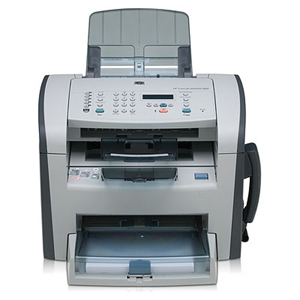
 HP LaserJet M1319f MFP is an illustration of the most recent all-in-one inkjet printer manufactured through Hewlett packard. This device offers scanning, fax needed, publishing and duplicating providers. This equipment is both a cost-efficient and period efficient expense because of its multi tasking abilities. This machine may printing a maximum 8000 pages monthly, make 99 document copies per day and holds up to Five hundred webpages of A4 dimension fax storage. 
HP LaserJet M1319f MFP

  Individual devices provide the mobility associated with comfort and ease of access. Personal sized copiers are tailored little and light to permit users to maneuver and still access their own copiers without any hassle.

  Canon PC170 copier machine is an analog copying device that can fit in little spaces. The size of this devices are 32" width and 4.5" elevation. It's similar to the usual flat DVD player. Personal Copy machines like this can make duplicating providers available at house and places the user desire to proceed.
Canon PC170

  The copier devices is one of the numerous great contributions of technologies that help improve life and produce high quality residing.

Source:

Blog Archive